2026-08-31
Under Cabinet LED Lighting: A Complete Buying Guide
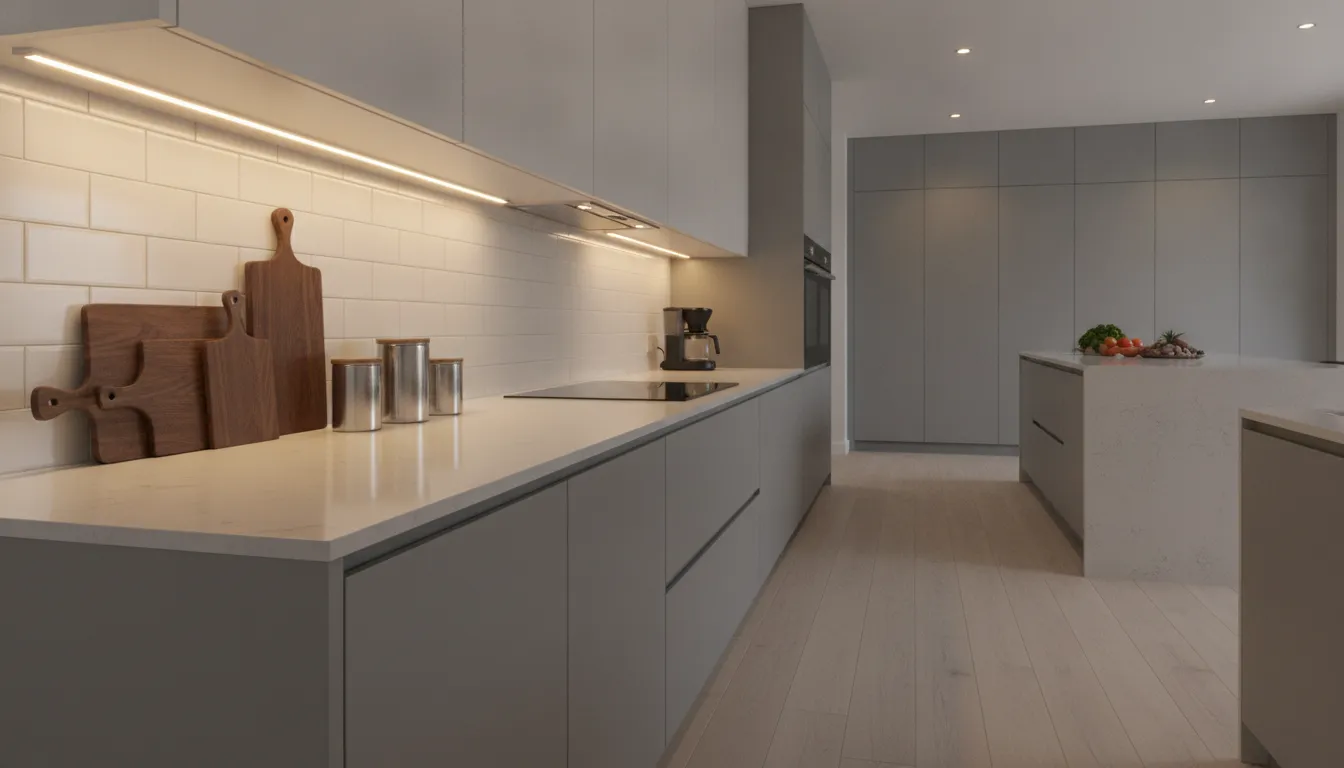
The best under cabinet led lighting does not call attention to itself. It quietly makes work surfaces clearer, reduces shadows, and adds a comfortable glow after dark. Achieving that effect takes more than attaching a strip beneath a cabinet. You need to choose the right fixture for each area, place it where it can spread light effectively, and select compatible drivers, dimmers, connectors, and controls. You also need to account for heat, moisture, voltage drop, and future repairs. Whether you are updating one cabinet run or planning lighting for an entire kitchen, this guide will help you make practical choices before installation begins.
Key Takeaways
- Start with a clear lighting plan: Measure cabinet sections, identify outlets and wire paths, divide the space into zones, and define whether each area needs task, accent, or ambient light.
- Choose fixtures by performance, not appearance alone: Use strips for continuous coverage, puck lights for focused illumination, or bars for broad light. Compare lumens, color temperature, CRI, voltage, beam angle, and cabinet clearance.
- Build safely and promote your expertise online: Test placement, glare, dimming, heat, and connections before final installation. Use compatible components, hire an electrician for hardwired work, and create a lighting-focused website with lit-365.com using the Airo AI Builder and 50 free credits.
How Do You Plan Under-Cabinet LED Lighting?
A successful under-cabinet lighting plan starts with how you use the space. A kitchen countertop used for chopping and cooking needs clear, even illumination, while a display cabinet may only need a soft wash of light. Before comparing fixtures, decide what each area needs, measure the cabinet layout, and identify how the system will receive power.
Plan the layout before you buy anything. This helps you avoid common issues, such as strips that are too short, fixtures blocked by cabinet doors, uneven spacing, and cables that cannot reach the nearest outlet. For more guidance on cabinet measurements and installation requirements, review this under-cabinet lighting guide from aspectLED.
Define task, accent, and ambient lighting goals
Begin by deciding what each light needs to accomplish. Task lighting should make countertops, desks, vanities, and other work surfaces easier to see. Fixtures producing about 200 to 500 lumens per foot are generally suitable for these areas, though the ideal output depends on cabinet height, surface color, and existing room light.
Accent lighting has a more decorative purpose. It can highlight a backsplash, illuminate open shelving, or draw attention to products in a retail display. Around 100 to 200 lumens per foot may be enough for a subtle effect. Ambient lighting provides a broader, softer glow that helps the room feel comfortable without making one surface noticeably brighter than the rest.
Write down the purpose of every cabinet run before shopping. This makes it easier to compare LED strips, puck lights, and bars based on brightness and coverage rather than appearance alone. This under-cabinet lighting guide offers additional guidance on brightness ranges for different lighting goals.
Measure cabinet runs, depth, outlets, and power access
Measure the length of every cabinet run, including sections separated by sinks, appliances, or open shelving. Record the depth of each cabinet too. A shallow cabinet may not have enough clearance for a wide bar fixture, while a deeper cabinet may require a forward-facing installation to light the countertop properly.
Next, locate nearby outlets, switches, and possible wire paths. Note whether an outlet sits inside a cabinet, beneath the counter, or on an adjacent wall. Measure the distance between the power source and each planned lighting zone. Longer cable runs may require additional wire, connectors, or a different system design.
Keep your measurements in one document, along with the number of corners, gaps, and cabinet sections. Record obstructions such as range hoods, trim, and cabinet doors. These details help you choose suitable fixture lengths and estimate power requirements before installation. They also give an electrician useful information if you plan to install a hardwired system.
Divide the space into lighting zones
Treat each part of the room as a separate lighting zone instead of connecting every fixture to one continuous run. A kitchen might have zones for food preparation, the sink, a coffee station, and decorative shelving. In a bathroom, the vanity and storage cabinets may need different brightness levels. An office could use one zone for the desk and another for display shelves.
Separate zones give you more control. You can use bright task lighting while cooking, then switch to a softer accent setting later. Zoning also makes troubleshooting easier because a problem in one section is less likely to affect the entire system.
Mark where each zone begins and ends, then select fixture lengths that fit those boundaries. Avoid large dark gaps and unnecessary overlaps. Keep spacing consistent across matching cabinet sections, unless the function of a particular area calls for a different arrangement. A balanced layout usually looks more intentional than fixtures installed wherever an outlet is available.
Place fixtures near the front edge for task lighting
For task lighting, position fixtures near the front half of the cabinet instead of placing them directly against the backsplash. This sends more light toward the center of the countertop and can reduce shadows from your head and arms. The placement works well above food preparation areas, desks, and bathroom vanities.
The ideal position depends on the cabinet depth and fixture type. A slim LED strip may sit close to the front edge, while a puck light may work better slightly farther back to spread light across the surface. Avoid placing a fixture so close to the edge that it is visible from normal standing height. If the fixture cannot remain hidden, use a trim piece, channel, or diffuser.
Test several positions before permanent installation. Hold the fixture beneath the cabinet and view the countertop from a typical working stance. Flexfire LEDs’ installation guide recommends testing placement to balance coverage, visibility, and shadow control.
Place fixtures near the back for softer accent lighting
Accent lighting often works best near the backsplash or back edge of the cabinet. From this position, the light washes across the wall and creates a softer, more diffused effect. It can emphasize tile, stone, textured paint, open shelving, or decorative objects without making the countertop overly bright.
Back placement can also keep the fixture discreet. The cabinet face hides much of the light source, especially when you install an LED strip inside an aluminum channel with a diffuser. Be careful with glossy backsplashes, since a fixture aimed directly at a reflective surface may create distracting glare or visible reflections.
Use lower output for accent zones than for work areas, and consider adding a dimmer if the lights will stay on for extended periods. Warm light often feels comfortable for decorative applications, but match the color temperature to the surrounding room and the finishes you want to highlight.
Test coverage in kitchens, bathrooms, offices, and retail displays
Test the lighting before applying adhesive, drilling mounting holes, or completing permanent wiring. Use temporary tape or place the fixtures loosely beneath the cabinets, then inspect the result during both daylight and evening conditions. View the lighting from the position where people will cook, wash, work, or browse products.
Check for dark areas, bright spots, glare, and unwanted shadows. In a kitchen, make sure your hands and utensils do not block the work surface. In a bathroom, check the mirror and vanity for uncomfortable reflections. In an office, look for glare on monitors. In a retail display, inspect products from several angles to confirm that the lighting shows their colors and details clearly.
Test each zone separately, then turn all zones on together. This shows whether one area overwhelms the others or whether the room needs layered brightness. It is also the right time to check cable reach, connector locations, dimming response, and visible hotspots. Testing early can save you from removing and reinstalling the entire lighting system later.
Which Under-Cabinet LED Lighting Fits Your Space?
The right under-cabinet LED lighting depends on how you use the space, how much coverage you need, and how much clearance you have beneath the cabinets. A kitchen countertop used for chopping and cooking needs steady, comfortable illumination. A bathroom vanity may suit softer light, while a home office or retail display may need focused lighting for specific areas.
LED strips, puck lights, and light bars can all work well, but they create different effects. Compare their coverage, mounting options, brightness, and power requirements before you buy. Your cabinet depth and surface finish also matter. A fixture placed too close to the front edge may cause glare, while one mounted too far back can leave the front of the countertop in shadow.
Use LED strips for flexible, continuous coverage
LED strip lights are a strong choice for long cabinet runs and surfaces that need consistent illumination. They are flexible, available in different lengths and colors, and can usually be cut at marked points. Since the LEDs run along the strip, they provide more continuous coverage than separate puck lights.
Use strips beneath kitchen cabinets, floating shelves, bathroom storage, and built-in desks. They work especially well when you want the light to follow the full length of a surface. Bradco Kitchens & Baths explains that LED strip output commonly ranges from about 200 to 550 lumens per foot, although LED density, diffuser quality, and mounting position affect the result.
For a polished installation, place the strip inside an aluminum channel with a diffuser. This setup protects the LEDs, helps manage heat, and softens visible points of light on glossy countertops.
Use puck lights for focused task or accent lighting
Puck lights are compact, round fixtures that produce concentrated pools of light. They are useful for highlighting a sink, a section of countertop, an open shelf, or an item inside a display cabinet. Their small size also makes them practical for cabinet layouts where a continuous strip would be difficult to fit.
Space puck lights carefully to reduce dark gaps, and position them so the beam reaches the work surface without shining directly into your eyes. Frosted lenses and wider beam angles can make the light feel less harsh.
Puck lights may not be ideal as the only source of task lighting. According to Bradco Kitchens & Baths, they can create hotspots and separate pools of light. Use them as accent fixtures or pair them with a strip or bar when you need more even coverage.
Use LED bars for broad, even illumination
LED light bars offer a practical middle ground between flexible strips and individual puck lights. Their rigid housing creates a broad beam, making them suitable for wide countertops, long desks, and retail displays that need consistent illumination.
Bars are often easier to position than loose strips because they have a defined shape and built-in mounting points. Many models include a diffuser that reduces visible LED dots and spreads light across the surface. City Lights SF describes light bars as a more even option than puck lights, particularly for larger areas.
Measure each cabinet section before ordering. A bar that is too short may leave a dim patch, while an oversized fixture may extend past the cabinet or interfere with trim. Several shorter bars can suit cabinets separated by appliances or decorative molding.
Compare shadows, hotspots, glare, and cabinet depth
Brightness alone does not determine whether a fixture will work well. Its position, beam angle, and distance from the backsplash all affect the final result. A light mounted near the back of a deep cabinet may leave the front of the counter in shadow. A fixture near the front edge may shine into your eyes or reflect off a glossy surface.
Test the position before making the installation permanent. AspectLED recommends trying different placements to identify glare and find the most useful light spread. Use painter’s tape to hold a bar or puck in place, then check the surface from normal standing and seated positions.
Cabinet depth, counter color, backsplash material, and nearby windows also affect the result. A diffuser, lower-output fixture, or dimmer can reduce harsh reflections and help balance the light.
Choose individual fixtures or complete lighting kits
Individual components give you more control over the installation. You can select the right strip length, bar size, driver, connectors, dimmer, and mounting hardware for each cabinet run. This approach works well for unusual layouts, multiple lighting zones, and projects that require concealed wiring.
Complete kits are often easier for straightforward installations. They may include the light, power supply, connectors, mounting clips, and plug. Some also include an inline switch or remote control. Abby Lawson’s lighting guide notes that many pre-made options include an encased light, diffuser, and dedicated power source.
Before choosing a kit, confirm that its total length and power rating suit your space. Check whether replacement parts are available, too. Proprietary connectors and unavailable power supplies can make future repairs difficult, even if the initial installation is simple.
Combine fixture types for layered lighting
Combining fixture types can make a space more functional and comfortable. Use an LED strip or bar for general countertop coverage, then add puck lights where you want extra focus or visual interest. For example, a kitchen might use a strip above the main preparation area and puck lights inside glass-front cabinets.
You can also pair under-cabinet fixtures with ceiling lights, pendants, sconces, or toe-kick lighting. Each layer should have a clear purpose. Under-cabinet lighting should support the room’s general lighting rather than replace it, as Bradco Kitchens & Baths recommends.
Add separate switches or dimming zones when possible. Bright task lighting helps with cooking and detailed work, while a softer setting may feel more comfortable during dinner or late-night use. Independent controls let you adjust one area without turning on every fixture.
Match fixture shape to cabinet clearance
Measure the space beneath and behind the cabinet before selecting a fixture. A shallow cabinet may not have enough clearance for a bulky bar, while a deep cabinet can hide a narrow strip and limit its coverage. Look for cabinet lips, hinges, trim, and recessed panels that could block the beam or complicate installation.
Slim LED strips suit tight spaces because they require little room. Bars work well when you have a flat mounting surface and want a more finished appearance. Puck lights need enough clearance for their housing and mounting hardware, and they may sit lower than expected.
Consider placement as well as fixture size. A light near the front edge generally reaches more of the work surface, while one farther back creates a softer glow. Flexfire LEDs recommends lower-output strips when overhead lighting provides the main illumination. Test the fixture in place before cutting, drilling, or applying permanent adhesive.
What Brightness and Color Temperature Work Best?
The right under-cabinet LED lighting should make a work surface easier to see without creating glare, harsh shadows, or bright spots. Start by considering how you use the space. A kitchen counter for chopping and reading recipes needs more focused light than a bathroom vanity or retail display that mainly needs a soft accent.
Brightness and color temperature work together, but they describe different things. Brightness tells you how much light a fixture produces. Color temperature describes whether that light looks warm, neutral, or cool. You should also consider the cabinet depth, countertop finish, fixture position, and distance between the light source and the surface. Glossy counters reflect more glare, while dark surfaces absorb more light.
Before buying, compare the product specifications instead of relying on wattage alone. The Department of Energy’s LED lighting guide explains why lumens are a better way to compare light output, while watts describe energy use. A dimmable fixture can give you more control, but it still needs the right output, color quality, and installation position for the room.
Compare lumens and lumens per foot, not wattage alone
Watts measure electricity use, while lumens measure visible light output. For under-cabinet lighting, both figures matter, but lumens should guide your brightness comparison.
When shopping for LED strips, check the lumens per foot rating. This lets you compare strips of different lengths. To estimate total output, multiply the lumens per foot by the installed length. A five-foot strip rated at 200 lumens per foot produces less total light than a 10-foot strip with the same rating.
The highest lumen rating is not always the best choice. Excessive output can create glare, especially on polished countertops. Fixture design, diffuser quality, cabinet depth, and placement all affect how bright the surface looks. Compare those details alongside the lumen rating.
Match brightness to each lighting purpose
Task lighting needs enough output for food preparation, reading, grooming, or detailed work. As a starting point, many under-cabinet task applications work well with approximately 200 to 500 lumens per foot. Dark counters, deep cabinets, and rooms with limited overhead lighting may require more.
Accent lighting can use less output because it highlights a backsplash, display, or architectural feature rather than illuminating a work surface. Ambient lighting falls somewhere between task and accent lighting, depending on how much of the room the fixtures need to cover.
Treat these ranges as guidelines rather than fixed rules. A dimmable fixture lets you use brighter settings while cooking and softer settings in the evening. The Flexfire LEDs under-cabinet lighting guide provides further information about output, placement, and strip selection.
Use footcandle targets for general and detailed tasks
Footcandles describe how much light reaches a surface, so they can be useful when planning a workspace. For general kitchen activities, aim for roughly 40 to 70 footcandles on the counter. Detailed tasks, such as chopping, decorating, or reading small print, may need about 70 to 150 footcandles.
You do not need specialized equipment to make a practical assessment. Temporarily position the fixture, then check whether your hands cast shadows across the work area. If the counter still looks dim, increase the output, add another fixture, or move the light closer to the cabinet’s front edge.
Countertop color also affects the result. Light surfaces reflect more illumination, while dark stone, wood, and tile may need higher output to look equally bright. The Illuminating Engineering Society offers professional lighting resources for evaluating light levels in different environments.
Choose 2,700K to 3,000K light for a warmer feel
LED color temperature is measured in kelvins, abbreviated as K. Lower numbers look warmer and more yellow, while higher numbers appear cooler and bluer. Lighting between 2,700K and 3,000K creates a soft, welcoming appearance that works well in kitchens, dining areas, bedrooms, and living spaces.
Warm white lighting pairs naturally with wood cabinets, cream walls, and warm-toned countertops. It can also make a kitchen feel more comfortable when you use the lights in the evening.
Look at the other fixtures in the room before choosing a color temperature. If your ceiling lights are 3,000K, matching the under-cabinet lights will create a more consistent appearance. Mixing very warm and very cool fixtures can make surfaces and wall colors look uneven.
Choose 3,500K to 5,000K light for clearer tasks
Choose a neutral or cool white LED when visibility and detail matter more than a cozy atmosphere. Lighting from 3,500K to 4,100K often gives counters a clean, balanced appearance, while 5,000K creates a brighter, daylight-like effect.
These temperatures can work well in garages, workshops, laundry rooms, craft areas, and commercial displays. In kitchens, neutral white lighting may make food colors look clearer and help you see small details while preparing ingredients.
Do not choose 5,000K lighting simply because it sounds brighter. Color temperature describes the appearance of light, not its actual output. A 3,000K fixture and a 5,000K fixture can produce the same number of lumens. Compare the lumen rating separately, then select the color temperature that suits the room.
Check CRI, beam angle, LED density, and color consistency
Color Rendering Index, or CRI, indicates how accurately a light source shows colors. A CRI of 80 or higher suits many general applications, while 90 or higher is a better choice for kitchens, retail displays, artwork, and other spaces where color accuracy matters. ENERGY STAR’s LED lighting guidance offers more information about light quality and color performance.
Beam angle affects how widely light spreads. A narrow beam can create strong pools of light, while a wider beam provides more even coverage. LED density also matters for strip lights. More LEDs per foot generally create smoother illumination and fewer visible gaps, especially when paired with a diffuser.
Check color consistency if you plan to install multiple fixtures. Products from different batches can vary slightly, even when they share the same kelvin rating. Buying matching fixtures at the same time can reduce visible differences.
Use diffusers to reduce glare and hotspots
A diffuser is a translucent cover that softens light from an LED strip or bar. It spreads the output across the counter and helps hide individual LED points. This is especially useful when the strip is visible from across the room or installed above a glossy backsplash.
An aluminum channel can improve the finish further. It holds the strip in a straight line, helps manage heat, and provides a surface for the diffuser. Position the channel near the front of the cabinet, but angle it so the light reaches the work surface without shining directly into your eyes.
A diffuser cannot correct every lighting issue. If the strip has low LED density, you may still see uneven spots. In that case, choose a denser strip or an LED bar designed for continuous illumination. LEDsupply’s guide to LED strip channels explains how channels and diffusers affect installation and appearance.
Balance efficiency, heat, and operating costs
LED efficiency varies between products, even when their brightness ratings look similar. Compare lumens per watt when two fixtures provide a similar amount of light. A fixture that produces more light from the same energy may cost less to operate over time.
Heat management also affects performance and lifespan. LED strips installed in aluminum channels can transfer heat away from the diodes more effectively than strips attached directly to an unprepared surface. Avoid covering fixtures with insulation or placing them tightly inside enclosed spaces unless the manufacturer allows it.
Dimming can reduce energy use when full brightness is unnecessary, but the dimmer and power supply must be compatible with the LED system. Check the rated lifespan, warranty, and replacement options before buying. A slightly higher upfront price may be worthwhile if the fixture offers stable output, lower heat, and dependable replacement parts.
How Do Voltage and Power Affect LED Lighting?
Voltage and power affect nearly every part of an under-cabinet LED lighting installation. They determine how brightly the lights operate, how long a strip can run, where you can place the power supply, and which drivers, wires, connectors, and controls you need. Choosing the right setup starts with the LED strip or fixture’s voltage rating, then moves to total wattage and driver capacity.
Most under-cabinet systems use low-voltage LED strips or fixtures connected to a driver or transformer. Line-voltage fixtures connect directly to a household electrical circuit and follow different installation requirements. Before purchasing anything, check the voltage, wattage, maximum run length, location rating, and control requirements listed by the manufacturer.
Your lighting plan also affects the electrical design. A short strip above one cabinet may need only a small plug-in power supply. A kitchen with several cabinet runs may require multiple zones, a centralized driver, thicker cable, or power injection. Sketch the cabinet layout first, mark the nearest outlets or junction boxes, and identify where you can safely place drivers and controls. Keep power supplies accessible for inspection or replacement, and avoid placing them where heat, water, or crowded storage could damage them.
When in doubt, ask an electrician to review the plan, especially if you need new household wiring, a junction box, or a hardwired connection.
Compare 12V and 24V low-voltage systems
Both 12V and 24V systems work well for under-cabinet lighting, but they suit different layouts. A 12V system can be a practical option for short runs, compact fixtures, and small accent-lighting projects. It is also useful when the power supply sits close to the LEDs and the total wattage remains modest.
A 24V system is often a better choice for longer cabinet runs because it carries power more efficiently over distance. Flexfire LEDs identifies 24V as a popular choice for under-cabinet projects, including installations where the power supply sits under a sink or in a basement. Longer runs may also experience less voltage drop with 24V equipment.
Always match the strip, driver, dimmer, and connectors to the same voltage. Never connect a 12V strip to a 24V supply. Check the manufacturer’s maximum run length before choosing either system.
Choose line-voltage fixtures when appropriate
Line-voltage fixtures connect directly to your home’s electrical supply, so they do not need a separate low-voltage transformer. This can simplify a short installation, particularly when the fixture is close to an existing junction box or suitable power connection. Some line-voltage products also include integrated housings that contain the wiring and reduce the number of separate components.
AspectLED explains that line-voltage fixtures can suit installations with a short distance between the lights and power source. They may not be the best choice for every cabinet layout, however. Exposed cords, limited access to a junction box, or several separated cabinet sections can make the installation less convenient.
Treat line-voltage work as household electrical work. If the project requires new wiring, a junction box, or a permanent connection, hire a licensed electrician and follow local electrical codes. Do not assume that a line-voltage fixture is suitable for DIY hardwiring simply because it is easy to mount.
Calculate total wattage and reserve driver capacity
Start by finding the LED strip’s wattage per foot. Multiply that figure by the total length you plan to install. For example, a strip rated at 4 watts per foot across a 10-foot run requires 40 watts before you account for reserve capacity.
Flexfire LEDs recommends adding 20% extra capacity so the power supply does not operate continuously at its maximum rating. In this example, choose a driver rated for at least 48 watts. A driver with additional capacity can also accommodate a small future extension, but avoid selecting one based on wattage alone.
The driver’s output voltage must match the LED system. A higher-wattage driver is not safe if it delivers the wrong voltage. Include every connected strip, puck, controller, and accessory in your calculation. If a product lists power consumption per fixture instead of per foot, add the wattage of each fixture together. Keep your calculations and product specifications with the installation records for future troubleshooting.
Match drivers, transformers, wire gauge, connectors, and polarity
Every component in a low-voltage system needs to support the same electrical requirements. Match the driver or transformer to the LED voltage and total wattage, then choose wires, connectors, switches, and dimmers that support the load. A plug-in power supply can work well for a small project, while a larger installation may need a centralized driver or hardwired supply.
Pay close attention to polarity. Most LED systems use positive and negative connections, and reversing them can stop the lights from working or damage certain components. Use connectors designed for the strip’s width, cut points, number of conductors, and waterproofing needs. Flexfire LEDs notes that the power supply must match the strip and control system.
Wire length also matters. Longer cable runs create more resistance, so they may require a thicker wire gauge. Keep connections secure, protect them from moisture, and follow the manufacturer’s wiring diagram rather than relying on connector color alone.
Prevent voltage drop across long strip runs
Voltage drop occurs when resistance in the LED strip or connecting wire reduces the power available farther from the source. The first part of the strip may look bright while the far end appears dimmer or shows a different color. This problem is more common with long, continuous runs and high-wattage strips.
You can reduce voltage drop by using a 24V system, shortening individual runs, using thicker wire, or supplying power from more than one point. The Hook Up recommends a higher-voltage system for longer LED strip runs. Follow the manufacturer’s maximum run length, even if the strip physically reaches farther.
For longer layouts, consider parallel wiring or power injection. Power injection supplies electricity to another point along the strip, helping maintain more consistent brightness. Test the complete system at full brightness before concealing wires, installing trim, or attaching diffusers. Check both ends of each run for brightness and color consistency.
Confirm power-supply and dimmer compatibility
A dimmer must work with the LED driver, strip type, voltage, and total load. Some low-voltage systems use pulse-width modulation, while others require a driver designed for a particular dimming method. A standard household dimmer may not work with a low-voltage setup unless the driver specifically supports it.
Check the dimmer’s minimum and maximum load ratings before installation. The total LED wattage should fall within that range, with enough capacity for consistent operation. AspectLED recommends confirming that the dimmer is compatible with the LED driver and can handle the strip’s total wattage.
If the lights flicker, dim unevenly, remain partly lit when switched off, or produce an audible hum, stop and check the control system. The issue may come from an incompatible dimmer, an undersized driver, a loose connection, or a load below the dimmer’s minimum rating. Use components from the same control ecosystem when possible.
Separate task, accent, and ambient circuits when needed
One control can operate every under-cabinet light, but separate circuits or zones give you more flexibility. Task lighting above a countertop may need bright, clear illumination, while accent lighting along a cabinet edge can remain softer. Ambient lighting can provide a comfortable glow after dark without producing the intensity needed for food preparation.
Separate controls let you adjust each lighting purpose independently. Abby Lawson recommends using separate controls for task, accent, and ambient lighting. You can assign each zone its own switch, dimmer, timer, motion sensor, or smart control, depending on the system.
Separate zones can also make troubleshooting easier because each circuit has its own connections and load. Label every driver, cable, and control during installation, especially when several cabinet sections share a room or power source. If the system uses multiple drivers, leave enough ventilation around each one and make sure the combined load does not exceed the circuit’s capacity.
Check damp ratings and safety certifications
Kitchens, bathrooms, laundry rooms, and bar areas can expose lighting to steam, splashes, and humidity. Check the fixture’s damp or wet-location rating before installing it near a sink, cooktop, or other moisture source. A product designed only for dry locations may not be suitable where water or condensation is common.
Inspect the rating of the driver, connectors, cables, and controls, not just the LED strip or fixture. An enclosed strip may still need a compatible channel, cover, or sealed connector to protect its electrical connections. AspectLED advises checking damp ratings and safety certifications, particularly in areas prone to moisture.
Look for recognized safety certifications and follow the installation instructions for spacing, ventilation, and mounting. Keep drivers away from heat and water, and do not place them inside cramped, unventilated spaces. Have a licensed electrician review permanent household wiring or any installation near plumbing and wet locations.
Which Installation Method Fits Your Setup?
The right installation method depends on your cabinet layout, access to power, desired appearance, and comfort level with electrical work. A plug-in fixture may suit a small kitchen, while a low-voltage system can provide consistent coverage across a longer cabinet run. Hardwired lighting offers the cleanest appearance, but it requires more planning and often professional installation. Battery-powered fixtures are flexible, though they need regular charging or battery replacement.
Before buying anything, map out the location of each fixture, power supply, wire, switch, dimmer, and connector. Measure the cabinet runs and note nearby outlets, sinks, cooktops, and areas where heat or moisture may be present. Also consider how permanent you want the installation to be. Adhesive-backed strips are convenient for quick updates, while mounting clips, aluminum channels, and hardwired fixtures create a more secure, finished result.
Compare plug-in, hardwired, low-voltage, and battery-powered options
Plug-in under-cabinet lights are usually the easiest to install. They connect to an existing outlet and can be replaced or moved without altering your home’s wiring. The main drawback is that cords may remain visible unless you route them through a raceway or along the cabinet underside.
Battery-powered fixtures avoid wiring and work well in rentals, small spaces, or areas without a nearby outlet. However, frequent use means you will need to recharge or replace batteries regularly. Hardwired fixtures connect directly to the electrical system and create a streamlined appearance, but they generally require an electrician. Low-voltage systems use a driver or transformer to power LED strips and fixtures. The Department of Energy’s LED lighting guidance explains how LEDs can use less energy and produce less heat than many traditional light sources.
Choose DIY installation or hire a licensed electrician
A DIY installation may be suitable for battery-powered lights, plug-in fixtures, and some low-voltage kits with simple connectors. If you can measure accurately, follow the product instructions, and keep connections protected, you may be able to complete the project with basic tools. Turn off power before working near existing wiring, and never proceed if you are unsure which circuit controls the area.
Hire a licensed electrician for hardwired fixtures, new outlets, junction-box work, or any installation that changes your home’s fixed wiring. Professional help is also a sensible choice when the cabinet layout is complicated, the circuit is already heavily used, or the lighting will be installed near water. The National Electrical Contractors Association offers industry information that can help homeowners understand the value of qualified electrical work.
Mount strips with adhesive, clips, or aluminum channels
Adhesive-backed LED strips install quickly and can provide continuous coverage along a cabinet run. They perform best on smooth, clean surfaces and should not be the only support in areas exposed to heat, moisture, or regular movement. Mounting clips provide additional stability and make it easier to remove or replace a strip later.
Aluminum channels offer a more finished appearance. They keep the strip straight, protect it from accidental contact, and help move heat away from the LEDs. Channels are especially useful on long runs or beneath cabinets that are visible from standing height. Select a channel that matches the width of your strip and provides enough space for the diffuser. Check the manufacturer’s instructions before cutting the strip or channel.
Clean surfaces before applying strip-light adhesive
Dust, grease, cooking residue, and moisture can prevent strip-light adhesive from bonding properly. Wipe the mounting surface with a suitable cleaner, then let it dry completely before installation. Kitchen cabinets often collect a thin layer of oil near cooktops and food preparation areas, even when the surface appears clean.
Measure and mark the route before removing the backing from the adhesive. Expose the backing gradually, pressing each section firmly as you work. Keep your hands dry, and avoid stretching, twisting, or sharply bending the strip. If the product includes separate tape, clips, or brackets, use the recommended mounting hardware instead of adding an incompatible adhesive. Good surface preparation helps prevent peeling and uneven sections later.
Use channels and diffusers for a cleaner finish
An aluminum channel can make LED strip lighting look more like a finished fixture than a loose strip attached beneath a cabinet. It holds the LEDs in a straight line and protects them from splashes, cleaning products, and accidental contact. A diffuser fits over the channel and softens individual points of light, reducing the dotted appearance common with some LED strips.
Channels can also spread light more evenly across the countertop. Choose a shallow profile when cabinet clearance is limited, or a deeper profile when you need additional room for the strip and diffuser. Confirm the channel width before ordering. For a polished installation, cut the channel cleanly, add compatible end caps, and plan where wires will enter and exit. Some channels are designed for corners or angled surfaces, which can help with unusual cabinet layouts.
Position fixtures to limit shadows and light the work surface
Fixture placement affects both the usefulness and appearance of your lighting. For food preparation, reading, or detailed work, position the fixture closer to the front edge of the cabinet. This directs more light onto the counter and reduces shadows caused by your body. A strip installed too close to the wall may leave the front portion of the work surface dim.
For accent lighting, placing the fixture nearer the backsplash can create a softer glow. Consider cabinet depth, backsplash height, countertop appliances, and reflective surfaces before securing the light. Use painter’s tape to hold the fixture temporarily and test the effect from normal standing positions. This quick check can reveal glare, dark corners, or reflections that are difficult to notice when viewing the fixture from below.
Conceal wires without pinching or over-bending them
Neat wire routing improves the finished appearance, but it should never compromise safety or performance. Use low-profile cable clips, raceways, or channels to guide wires along the underside or back of the cabinets. Keep cables away from sinks, cooktops, sharp edges, and areas where doors or drawers could catch them.
Avoid folding wires tightly behind fixtures or forcing them into narrow gaps. Excessive bending can damage conductors, connectors, or the LED strip. Follow the manufacturer’s minimum bend radius, especially when routing strips around cabinet corners. Leave a small amount of slack near connectors and power supplies so you can inspect, replace, or adjust components later. Secure loose cable rather than allowing it to hang near heat or moisture.
Test brightness, flicker, heat, dimming, and connections first
Test the complete system before permanently securing every fixture. Turn the lights on at their highest and lowest settings, then check whether they dim smoothly. Look for visible flicker, inconsistent color, dark sections, or connectors that become unusually warm. If the system includes a remote, wall switch, motion sensor, or smart controller, test each feature from its intended location.
Let the lights run long enough to reach their normal operating temperature. LEDs may feel warm during normal use, but excessive heat, a burning smell, discoloration, or buzzing indicates a problem. Confirm that the light covers the areas you planned to illuminate and that cabinet doors, diffusers, or backsplashes do not create glare. Testing before final mounting gives you a chance to correct placement and connections without redoing the entire installation.
Avoid overloaded drivers, loose connections, and mismatched parts
Every component in a low-voltage system needs to be compatible with the others. Check the strip’s voltage, total length, wattage, connector type, and polarity before connecting it to a driver or transformer. The driver should have enough capacity for the complete run, with some reserve instead of operating continuously at its maximum rating.
Loose connectors can cause flickering, intermittent operation, or sections of strip that stop working. Secure each connection according to the product instructions, and protect connectors from moisture and accidental pulling. Do not combine components simply because they appear to fit. A strip, driver, dimmer, and connector from different systems may use incompatible voltage, wiring, or control signals. When in doubt, use components from the same product line or ask the manufacturer to confirm compatibility.
Follow electrical codes and hire a licensed electrician for hardwiring
Hardwired under-cabinet lighting becomes part of your home’s electrical system, so the installation must meet local requirements. Rules may cover wire type, junction boxes, grounding, switch placement, circuit capacity, and protection in damp locations. Requirements vary by location, and a product manual may not address every part of the project.
Before starting a hardwired installation, contact a licensed electrician and check whether your local authority requires a permit or inspection. The National Fire Protection Association’s electrical safety resources provide practical guidance for reducing electrical hazards at home. Professional installation costs more upfront, but it can help prevent unsafe connections and make future repairs easier. Keep receipts, product manuals, and wiring information for the next homeowner or anyone who services the system.
How Do You Control and Maintain Under-Cabinet LED Lighting?
A well-planned under-cabinet LED system should be easy to control, comfortable to use, and simple to maintain. Start with the way you use the room. A wall switch suits a permanent kitchen installation, while an inline dimmer works well for a plug-in strip or bar light. Remote controls and smart systems offer more flexibility when you want to adjust brightness, color temperature, or lighting scenes without reaching under the cabinets.
Maintenance begins with compatible equipment and careful installation. Match the LEDs, power supply, dimmer, controller, and connectors before connecting the system. Keep power supplies ventilated, avoid excessive bending around corners, and inspect the wiring when you notice flicker, fading, buzzing, or unusual heat. The U.S. Department of Energy’s LED lighting guidance explains how operating conditions affect LED performance and service life.
Most quality LED fixtures are rated for 25,000 to 50,000 hours, but that figure applies to the light source under stated conditions. Drivers, sensors, adhesives, and connectors may need attention sooner. Clean the fixtures regularly, especially in kitchens where grease and dust can collect on diffusers. Keep warranty information and product specifications in one place so you can find compatible replacement parts when needed.
Compare wall switches, inline dimmers, remotes, and smart controls
Wall switches provide straightforward control and work well when you want all the lights in a room to turn on together. They are a practical choice for hardwired installations, particularly in kitchens with clearly defined lighting zones. Inline dimmers sit between the power source and the fixture, making them useful for plug-in LED bars and strips. They are usually easy to install and operate.
Remote controls let you adjust brightness or color without touching the fixture. Smart controls connect with an app, voice assistant, or home automation system. Before choosing one, check its voltage, wattage, LED type, and dimming method. A controller made for single-color LEDs may not support tunable-white or RGB lighting. Flexfire LEDs’ installation guide provides an overview of dimmers and control options.
Add motion sensors, timers, scenes, or occupancy controls
Motion sensors can turn lights on when you enter a kitchen, pantry, closet, or work area. They are convenient for late-night trips when you do not want to search for a switch. Some models detect movement, while others respond when a cabinet door opens. Check the sensor’s detection range and position it where cabinets or appliances will not block its signal.
Timers switch lights off after a selected period, reducing the chance that they remain on unnecessarily. Smart systems may also let you create scenes, such as a bright setting for food preparation and a softer setting for evening use. Occupancy controls suit offices, utility rooms, and retail displays. Set the delay long enough to prevent the lights from switching off while someone is standing still.
Confirm control, LED, and power-supply compatibility
Check compatibility before connecting any component. Match the dimmer or controller to the LED system’s voltage, wattage range, and control type. A 12-volt LED strip needs a compatible 12-volt power supply, and a low-voltage dimmer must be installed in the correct part of the circuit. Mismatched components can cause flicker, buzzing, limited dimming, or permanent damage.
Add the wattage of every connected fixture, then choose a driver with enough capacity and some reserve. Also confirm connector polarity, plug type, wire gauge, and the maximum recommended strip length. If the installation involves new wiring or hardwiring, consult a licensed electrician. Lumaz Life’s under-cabinet lighting guide also emphasizes stable power and compatible components.
Create separate controls for each lighting zone
Separate controls make the lighting more useful and can reduce unnecessary energy use. You might create one zone for task lighting over the main preparation area, another for accent lighting over open shelving, and a third for softer illumination near a breakfast bar. Each zone can then have its own switch, dimmer, sensor, or smart scene.
Zoning also helps manage glare. Bright task lighting can illuminate the countertop while accent lighting remains dimmer. In a larger kitchen, separate controls prevent you from lighting the entire room when you only need light in one section. Plan the zones before installation, then group fixtures by purpose rather than connecting every fixture to the nearest outlet.
Review rated lifespans of 25,000–50,000 hours
Many under-cabinet LED products list a rated lifespan between 25,000 and 50,000 hours. Use this figure to compare products, but do not treat it as a guaranteed replacement date. Manufacturers calculate lifespan under specific operating conditions, and the LED diodes may outlast the driver, controller, adhesive, or connectors.
Frequent use, high temperatures, poor ventilation, and unstable power can shorten service life. When comparing fixtures, review the expected hours along with warranty coverage, operating conditions, and replacement-part availability. A product with a slightly higher purchase price may be the better choice if you can replace a failed driver or connector without replacing the entire lighting run.
Manage heat and power stability to extend LED life
LEDs produce less heat than many older lighting technologies, but they still need proper heat management. Do not cover fixtures with insulation or place drivers in cramped, unventilated spaces. Aluminum channels can support LED strips and help transfer heat away from them. Diffusers can also provide a cleaner finish while protecting the strip from dust and contact.
Stable power is just as important. Use a driver that matches the system’s voltage and total wattage, and do not extend a strip beyond its recommended run length. Long runs can experience voltage drop, which may make LEDs at the far end appear dimmer or change color. Keep connections secure, and confirm that fixtures installed near sinks or other damp areas have the appropriate rating.
Compare warranties, replacement parts, and maintenance needs
A warranty offers useful protection, but read the terms before purchasing. Check the coverage period, included components, exclusions, return-shipping requirements, and whether labor is covered. Some warranties cover the fixture but exclude the power supply, adhesive, controller, or damage caused by incorrect installation.
Replacement parts may matter as much as the warranty itself. Look for brands that sell compatible drivers, connectors, mounting clips, diffusers, and controllers separately. This can prevent you from replacing a complete lighting run because one small component failed. Also consider whether the fixture is easy to remove and reinstall. ENERGY STAR’s lighting resources can help you compare efficiency and product performance information.
Clean fixtures and diffusers to preserve brightness
Dust, grease, and cooking residue can collect on under-cabinet fixtures, especially those installed above stovetops and food-preparation areas. Turn the lights off and let them cool before cleaning. Wipe the housing and diffuser with a soft, slightly damp cloth, then dry the surface completely. Follow the manufacturer’s instructions if the diffuser can be removed.
Do not spray cleaner directly onto an LED fixture, connector, switch, or power supply. Liquid can enter openings and damage electrical components. Use a mild cleaner for stubborn residue, and test it on an inconspicuous area first. Before installing adhesive strips, clean and dry the mounting surface thoroughly. Flexfire LEDs’ installation instructions explain why surface preparation affects strip adhesion.
Address flicker, fading, heat, and control issues early
Flicker may indicate a loose connector, overloaded driver, incompatible dimmer, or unstable power supply. Fading near the end of an LED strip often points to voltage drop, while a sudden loss of light may come from a failed connector or power component. Turn off the system before inspecting accessible connections, and confirm that plugs and terminals are firmly seated.
Excessive heat, buzzing, discoloration, or a burning smell requires immediate attention. Turn off the lights and ask a qualified professional to inspect the installation. If a remote or smart control stops responding, replace its batteries, check the app connection, and confirm that the controller still has power. Early troubleshooting can protect the remaining components and prevent a small fault from becoming a full replacement.
How Do You Compare LED Brands, Prices, and Reviews?
Choosing under-cabinet LED lighting involves more than comparing fixture styles or advertised prices. A low-cost kit may seem like a good deal, but the final cost can rise if you need a separate driver, compatible dimmer, extension wires, mounting channels, or replacement adhesive. Compare the complete system, including the lights, controls, power components, installation hardware, warranty, and technical support.
Start by listing the features your space needs. Consider the cabinet length, desired brightness, color temperature, control method, voltage, installation type, and moisture exposure. Then compare products with similar coverage. A basic puck light should not be judged against a fully integrated smart lighting system using the same price comparison.
Customer reviews can fill in details that product pages do not explain, such as glare, flicker, adhesive strength, and connector quality. Give the most attention to verified reviews that describe the installation, cabinet layout, and length of use. A side-by-side checklist makes it easier to spot missing parts, unclear specifications, and recurring complaints before you buy.
Shortlist reputable brands with strong support
Start with manufacturers that publish complete product specifications and offer accessible customer support. Look for details about lumens, color temperature, voltage, wattage, mounting options, compatible dimmers, and power requirements. Clear installation instructions and wiring diagrams are also useful signs that a brand supports its products properly.
Support becomes especially important when your system includes several components. You may eventually need an extra connector, replacement driver, extension wire, or compatible control. Check whether the brand sells individual parts rather than requiring you to replace the entire kit. Resources such as Armacost Lighting’s under-cabinet lighting guide can help you compare fixture types and system requirements before making a shortlist.
Compare strip, puck, bar, and complete-kit options
LED strips are a flexible choice for continuous light across long cabinet runs. They can be cut at marked points and shaped around corners, although many installations require a compatible driver, connectors, clips, or an aluminum channel. Puck lights create concentrated pools of light, making them useful for accent lighting or smaller work areas.
LED bars usually provide broader, more even coverage with fewer visible hotspots. Complete kits can simplify installation because they often include fixtures, wiring, a driver, and mounting hardware. Check exactly what each package contains before comparing prices. A kit with a higher purchase price may cost less overall than assembling a strip system from separate components.
Also consider the shape and depth of your cabinets. A thick bar may not fit beneath a shallow cabinet, while a flexible strip may need a channel to create a finished appearance. Combine fixture types when one style cannot provide both practical task lighting and softer accent light.
Evaluate brightness, color quality, controls, voltage, and installation
Compare the specifications that affect how the lights will look and perform. Lumens describe the amount of light produced, while color temperature indicates whether the light appears warm or cool. CRI, or color rendering index, shows how accurately the light displays colors. A higher CRI can be useful near food preparation areas, artwork, retail displays, and makeup mirrors.
Check whether the product supports dimmers, remotes, motion sensors, timers, or smart-home controls. Confirm the voltage and installation method before ordering. A plug-in bar may suit a rental or small project, while a hardwired system can create a cleaner finish during a permanent remodel. DEKOR’s under-cabinet lighting collection shows how fixture styles and system components can differ.
Use $19–$145 as an initial DIY price range
A DIY under-cabinet LED project may cost approximately $19 to $145 as a starting point. The final amount depends on cabinet length, fixture type, brightness, controls, and the components included in the package. Use this range to plan an initial budget rather than treating it as a guaranteed project total.
Check the coverage area carefully. A low-priced kit may contain one puck light or a short strip, while a more expensive package may cover several cabinet runs and include a driver. Calculate the cost per illuminated foot or cabinet section for a fairer comparison.
A simple plug-in system will usually cost less than a multi-zone installation with dimming and concealed wiring. If you are lighting a large kitchen, price the system by zone so you can decide whether every cabinet needs the same fixture type.
Budget for drivers, connectors, dimmers, channels, and hardware
The light fixture is only one part of an under-cabinet system. LED strips may need a compatible driver, wire, connectors, mounting clips, an inline switch, or an aluminum channel with a diffuser. Longer runs may require additional power feeds or wiring to keep the brightness consistent from one end to the other.
Create a parts list before placing an order. Include extension wires, corner connectors, cable clips, mounting brackets, dimmers, and replacement adhesive where applicable. Product collections such as Kitchen Power Pop Ups’ under-cabinet lighting range can help you identify accessories that are easy to miss.
Check connector compatibility carefully. Some brands use proprietary plugs, while others use standard connections. Mixing parts from different manufacturers can create fit, polarity, or dimming problems, even when the voltage appears to match.
Compare material costs with professional installation
DIY installation can reduce labor costs, especially for plug-in and low-voltage systems. It may be practical when you are lighting a short cabinet run and have a nearby outlet. Hardwired systems, concealed wiring, new circuits, and installations in finished walls usually require more skill and careful planning.
Ask an electrician for an itemized estimate that separates materials from labor. Then compare that quote with the cost of a complete plug-in or low-voltage kit. Include the price of channels, wiring, controls, and any cabinet modifications in your DIY estimate.
Professional installation may also provide a cleaner finish. An experienced installer can position fixtures for better work-surface coverage, conceal wires, protect connections, and reduce visible glare. Abby Lawson’s under-cabinet lighting guide offers a useful comparison of DIY planning and installation considerations.
Find discounts through bundles, newsletters, loyalty programs, and seasonal sales
Look for discounts after you know which components your project requires. Bundles can reduce the cost of matching fixtures, drivers, connectors, and controls. Some brands also offer discounts when you join an email list or loyalty program, while seasonal promotions may apply to complete kits or larger orders.
Compare the discounted total with prices from other retailers. A coupon may not save money if the package excludes the power supply or requires expensive accessories. Check shipping charges, return terms, and stock availability before placing an order.
Buying the full system from one supplier can reduce compatibility concerns, even if another retailer lists a lower price for an individual fixture. Save the product names and model numbers as well, since this information will help you find matching parts later.
Read verified reviews about brightness, adhesive, and connectors
Customer reviews often reveal practical details that product descriptions leave out. Look for comments about whether the lights provide enough brightness for food preparation, whether the adhesive stays attached to the cabinet surface, and whether connectors fit securely. Photos can also help you judge the fixture’s profile, wire visibility, and light distribution.
Give more weight to reviews that describe the cabinet length, surface material, fixture type, and intended use. A reviewer who says a strip was “too dim” may have installed it across a much longer run than you plan to light. Reviews that mention several months of use are generally more useful than comments posted immediately after delivery.
Independent testing can provide another perspective. The Spruce’s under-cabinet lighting reviews compare factors such as design, installation, controls, and overall performance.
Watch for recurring feedback about flicker, glare, heat, and durability
One negative review may describe a defective unit, but repeated complaints deserve attention. Look for patterns involving flickering, buzzing, excessive heat, weak adhesive, visible hotspots, or lights that fail after a short period. These issues may relate to the fixture, driver, dimmer compatibility, or installation method.
Glare is another concern. A bright fixture mounted near the front edge of a cabinet can shine directly into your eyes, while an exposed strip may create distracting points of light. Reviews that mention diffusers, aluminum channels, cabinet depth, and fixture placement can help you predict the finished result.
Consider heat and durability together. A product that runs hot may have a shorter service life or create problems in a confined cabinet space. Guidance from aspectLED’s under-cabinet lighting guide can help you assess placement, glare, and heat-management concerns.
Check replacement parts, certifications, shipping, and warranty service
Before buying, confirm that the brand sells replacement drivers, connectors, lenses, mounting clips, and compatible extension wires. Replacement availability matters most for systems with proprietary plugs or controls. If one component fails, accessible parts can save you from removing and replacing the entire installation.
Review safety certifications, damp-location ratings, and the warranty period. Kitchens and bathrooms may expose fixtures to moisture, so check whether the product is rated for the intended location. Also read shipping times, return conditions, and warranty claim requirements.
A product with clear technical documentation is easier to assess and install. iCabinetryDirect’s lighting guide covers several factors related to safety, installation, and product support. Keep your receipt, model numbers, and installation instructions in case you need a replacement or warranty service.
Build a side-by-side comparison from specifications and reviews
Create a shortlist of two or three systems with similar coverage and features. Record the fixture type, total length, lumens, color temperature, CRI, voltage, dimming options, control method, included accessories, warranty, and total delivered price. Add review notes about installation, heat, flicker, adhesive strength, connector fit, and long-term reliability.
Your comparison should show the complete project cost, not only the advertised fixture price. Include drivers, connectors, channels, wiring, dimmers, mounting hardware, shipping, and installation labor where applicable. This prevents a low upfront price from disguising a more expensive final setup.
Remove products with unclear specifications or repeated complaints about safety and performance. The strongest choice is the system that fits your cabinet layout, provides the right light quality, includes compatible parts, and has dependable support after installation.
Build an Under-Cabinet LED Lighting Website with lit-365.com
An under-cabinet LED lighting business needs more than a product list. Customers may need help comparing fixture types, choosing brightness and color temperature, planning power access, or deciding whether to handle installation themselves. Your website can answer those questions while giving visitors a clear way to request advice, a quote, or a product recommendation.
With lit-365.com, you can use the Airo AI Builder to turn your lighting idea into a live website. Start with the services and information your audience needs most, then build a helpful path from the first search to the next action.
Turn lighting expertise into service and buying-guide pages
Create pages around the projects you want to attract. A homepage can introduce your specialty, while separate service pages can focus on kitchen counters, bathroom vanities, office shelving, retail displays, or lighting design consultations. Explain the type of space you serve, the lighting problems you solve, and what customers can expect when they contact you.
Buying guides can answer common questions about LED strips, puck lights, bars, brightness, color temperature, dimming, and placement. Explain how fixture position affects shadows, glare, and task lighting. You can also link to useful industry guidance, such as this guide to under-cabinet lighting dos and don’ts, to support your recommendations and help readers make informed choices.
Publish comparisons, specifications, installation tips, and safety advice
Comparison pages make product research easier. Show how strip lights, puck lights, and LED bars differ in coverage, appearance, installation, and ideal use. Include specifications such as lumens, voltage, color temperature, CRI, fixture length, damp rating, controls, and expected lifespan. Focus on what each detail means in a real room, rather than simply copying a manufacturer’s specification sheet.
Installation guides can cover surface preparation, adhesive use, mounting clips, aluminum channels, diffusers, connectors, wire routing, and dimmer compatibility. Add clear safety advice for low-voltage and hardwired systems, especially in kitchens and bathrooms. Explain why LED lighting is often chosen for cabinets because it uses little energy, produces minimal heat, and comes in many brightness and color options, as noted in this under-cabinet lighting guide.
Add consultation forms, quote requests, and planning resources
Give visitors a simple way to describe their project. A consultation form can ask for the room type, cabinet dimensions, preferred color temperature, lighting goals, installation plans, and project timeline. For quote requests, allow customers to share photos, cabinet measurements, or a rough sketch. These details can help you provide a more useful response without several rounds of basic questions.
Planning resources can make the process easier for both you and your customers. Offer a measurement checklist, cabinet-run worksheet, or guide to selecting light-bar lengths. Explain why consistent spacing matters and why fixtures should fit the cabinet without leaving dark sections or extending beyond the edges. A project-planning page can also prompt visitors to identify outlets, power access, lighting zones, and preferred controls before they request a recommendation.
Use Airo AI Builder to turn your lighting idea into a live website
You do not have to start with a blank page. Describe your under-cabinet LED lighting business, the customers you serve, your service area, and the pages you want to include. Airo AI Builder can help turn that description into a website concept that you can refine into a live online presence.
Begin with the essential pages: a homepage, service pages, buying guides, an about page, and a contact page. Review the generated copy carefully, replace general statements with your own expertise, and add product details, photos, service areas, and customer questions. Use direct calls to action, such as “Request a Quote,” “Book a Consultation,” or “Plan Your Lighting.” A focused first version gives you a practical starting point while you continue adding content.
Start with 50 free credits on lit-365.com
If you are testing an under-cabinet lighting business idea, lit-365.com provides 50 free credits to get started. You can use them to develop an initial website, try different page structures, and see how your service information and buying guides work together before taking on a larger website project.
Prepare a short business description before opening the builder. Include your ideal customers, lighting types, installation options, service area, brand style, and preferred contact method. You can use those details in your Airo AI Builder prompt, then refine the pages as your concept develops. The result can be a clear online home for your lighting expertise, with useful resources and straightforward ways for customers to get in touch.
Frequently Asked Questions
What is the best type of under-cabinet LED lighting for a kitchen?\ LED strips or light bars usually work well for kitchen countertops because they provide more even coverage than individual puck lights. Puck lights can supplement the main fixtures by highlighting a sink, shelf, or specific work area.
How bright should under-cabinet LED lights be?\ Task areas often need approximately 200 to 500 lumens per foot, while accent lighting may need less. Use the lower end for light-colored counters and rooms with strong overhead lighting, and consider higher output for dark surfaces or detailed food preparation.
Should under-cabinet lights be warm or cool white?\ Warm white lighting between 2,700K and 3,000K creates a comfortable feel in kitchens and living spaces. Neutral or cool white lighting from about 3,500K to 5,000K may be more suitable for workshops, offices, bathrooms, and retail displays where detail and color clarity matter.
Can I install under-cabinet LED lighting myself?\ Many plug-in, battery-powered, and simple low-voltage kits are suitable for careful DIY installation. Hardwired fixtures, new outlets, junction boxes, and installations near water should be handled or reviewed by a licensed electrician.
How can I create a website for an under-cabinet lighting business?\ You can use the Airo AI Builder from lit-365.com to create a website from your business idea. Include service pages, lighting guides, consultation forms, quote requests, and installation information. The platform offers 50 free credits to help you get started.